Monday, November 30, 2009

Some more EBSCO insights

Back to the dreaded EBSCO.

...and if you hate it, just imagine what is was like BEFORE EBSCO (B.E.).  Once upon a time, we had to use INDEXES (yes books) to look up our topics.  The indexes would list article titles and authors and the publication that they appeared in. THEN you had to figure how to get a copy of that article.  Sometimes it would be in a bound journal (yes like a book) which you would have to locate on the shelf, page to the article and hope that it was something you wanted.  If you wanted a copy of it, you would have to take it to a photocopier, mash the journal face down on the glass (cause the inner margin was usually too small) and hope that you positioned it the right way so you got your article.  This would usually take several tries to get right.  Sometimes, the article would be on MICROFILM, or MICROFICHE.  Film was the worst--reels of film that you would have to feed into a microfilm reader and then scroll to the issue and page that you are looking for.  If you wanted a copy of it, you hoped that that printer was working properly (most of the time it wasn't).  This is assuming that you put the film through the reel correctly in the first place.  Often, it would be upside down or backwards and you'd have to start over again.

B.E. the process of finding articles took DAYS.  No easy citations either--you constructed your own and if you neglected to take down all the information on the article, you'd have to look it up AGAIN.

You have it good with EBSCO.  Really...

Someone mentioned that they were frustrated by EBSCO while looking for information on Plato so I thought I'd walk through the process...

Plato is a pretty broad topic, so I'm going to start basic with the Student Research Center.

I just typed in "Plato" in the search line and got 2638 results.  I know I want to research Plato the man not some computer program, so I choose the subject "Plato" at the left.  This narrows it down to 106 results.  Not bad, but I only want his Biography, so I click on that icon at the top.  This leaves me with only two results. Note that Student Research Center does not have the nifty magnifying glass icon that you can hover over, nor does it have the "Ask Ingrid!" tab at the top.  After clicking on the HTML full text option, I now have a pretty good overview of who Plato was and what he was mostly into which seems to be Western Philosophy in the area of Politcal Science and I file that away for other search strategies.  Just for the fun of it I clicked on "Find More LIke This" at the top and got seven related articles.  The "Gadfly of Ancient Greece" looks fun.  Nope, it's about Socrates, so I go back to the "RESULT LIST" (not the computer back-arrow).  There's a simplistic article on Plato that really doesn't tell me much, so I think I'm ready for the big time.  DO NOT HIT "EXIT!"  This takes you out of the EBSCO databases entirely.  Annoying.
Instead, go back to the main search screen and choose "Search Other Databases."

Back to the main EBSCO screen, we're now ready to SEARCH EBSCO RESEARCH DATABASES.  I could choose Academic Search Complete, but we know that my topic is for now a really broad one so I'll take a look at what other specific database options are available  I could go with "Religion and Philosophy Collection" since it includes Political Philosophy, but I think I'll try "World History Collection" cause I'm more interested in Plato as a historical figure.  START BROAD:  I type in Plato, and just to reduce frustration, I'll click on Full Text so that my results are not just article abstracts.  162 results.  Hey, not bad.  Let's choose "Plato" as a subject to get the extra junk out of the way.  My results seem to be a little haphazard (though there are only 29).  I don't really care about WHEN the article was written to I change the "Sort By" option to "Relevance" instead of "Date Descending."  Much better, but I see that I'm getting some book reviews which is not at all what I want.  I go to "Search Options" and select what I DO want under "Document Type."  You can choose more that one by holding down the button on the keyboard and now (after reselecting "Plato" as a subject and "Relevence" as a sort option) I have a list of articles that I can work with and save to my folder to read more thoroughly later (Hover over the magnifying glass and "Add to Folder").  Note, that unless you've logged in and saved to a personal folder, the folder will be emptied when you log out.

I'm ready for "Academic Source Complete" so I "Select Databases" check "Academic Source Complete" and uncheck "World History Collection."  It's remembered my basic "Plato" search, I'll add limiters for "Full Text" and "PDF Full Text."  Cool--there are images I can use on the side bar.  If I duplicate what I did with just the World History Collection, I can narrow down to usable results.  Note there are a lot more document types to choose from here. I chose "Articles" and then narrowed by the bar at the left to "Academic Journals" and got 314 articles.  If I sort by relevance, I now have some pretty fun results:  "Plato on the psychology of humor" and "Plato's rejection of thoughtless and pleasureless lives" for starters.

So--it's a thinking, evaluative process. Explore patiently, be curious, and give yourself lots of time to do so. 

Gotta go!

Bookishly yours on this dreary day (a good one to curl up with a book and a cup of tea!)

Ingrid

Monday, November 23, 2009

Some EBSCO tips

Some thoughts on Rebekah's senior unit on art and database suggestions that others might want to take note of.

IN GENERAL IN EBSCO: 

Create your own folder and store your articles in it.  See the "Folder" icon at the top.
Sign in when you start so that this option is available to you.


If in doubt, click on  the "Ask Ingrid"  tab at the top.  Do this ANYTIME you are not finding what you need.  It'll help me figure where your frustrations are (Yes, I've heard "I HATE EBSCO" more than once and yes, you are not the only ones).

Be patient.  In these Google days we all want everything NOW, but if you take your time you'll end up with much more useful information.  Believe me..

Take a good look at database options when you log in.  Sometimes Student Research Center is a good place to start to figure out which direction you're going.   Academic Source Complete is the monster that has a lot and can be overwhelming (or depressingly underwhelming depending on what you're looking for).  MAS Ultra has a lot more than articles, including primary source documents.  MasterFILE Premier covers general interest/public library type stuff.  Newspaper Plus is...well... newspapers.  Good for current events.  Several of the databases also include BOOKS.

Rather than worry about whether you are searching "find all words" or "Boolian/Phrase," enter your terms on separate lines in Advance Search.  An easy way to the narrow your search is to then click on highlighted terms in an article that has the kind of information that you want.  Hover over the folder with magnifying glass to get a synopsis of the article.

START BROADLY with your search.  Try to get a couple of basic terms that define what you're looking for and then figure out how the database has organized what you're looking for.

If you get too many results:

Use the Search Options on the right to further limit what KIND of results you're getting (such as date, full text, etc.)

Use the Narrow Results options on the left if they look good. 

If you don't get enough results:

Try rethinking your search strategy.  Pare it down to a more basic search and then use the options above to help you refine your search.

I'll try to offer more suggestions in future blogs.  Time is so limited!

Some specific ideas for Rebekah's assignment:

Start small with the
Religion and Philosophy Collection

If you're looking for phrases like "art interpretation" make sure you're using the ADVANCED SEARCH and enter your terms on two separate lines.  By default, this turns your search into Art AND Interpretation.  If you use the techniques above, you'll be able to refine your search with subject headings specific to your search.

For example, I searched on Art AND Interpretation and ended up with 499 results.  I then limited to the  "Full Text" option on the right (Remember to "Update Results").  This brought the results down to 454 --still a lot, but now I know that I only have full text.  One of my subject narrowing choices is "Art" and up to now, I haven't selected a subject, just search terms so I'll pick that one.  Here I discover that there's an entire journal dedicated to my topic:  The Journal of Aesthetics and Art Criticism and I take a note to search that title alone when I'm done with this search

The article "The Artist's Sanction in Contemporary Art" looks good.  I could either save that to my folder which I've created or if I want more help in refining my search, I click on the CITATION.  This gives me more search options by clicking on highlighed terms that look good.  Note that this will not "remember" your previous search terms.  Here "In Defence of Painting" looks good.  I add it to my folder, look at the citation, etc.

If you want to go back to a previous page DON'T use the browser's back button.  Instead use the "Return to Result List" option.

I tried another search using "Art" on one line and "Censorship" on the next  in the Advanced Search.  62 results--not bad.  I can work with this.

So by understanding what terms you need to use, you can hone in on your topic.  Once you feel comfortable with your search strategy, give "Academic Search Complete" a try. (Use the "Choose Databases" option at the top).  EBSCO remembers your search--when I search on "Art" AND "Censorship" here I get an overwhelming 883 results.  The first step is to limit to "Full Text" which narrows things down to 418 articles.  Here, I can either further narrow my search to Academic Journals or choose the subject heading "Art-Censorship."

EBSCO keeps a running tab of your limitations at the top of the results column.  If you don't like what you've ended up with, use the X to remove that option.

Out of time!  I'll try to add more thoughts another time.  Remember you can access the EBSCO databases from anywhere.  You just need the URL and the login/password.  Email me if you forget.

Whew!

Enjoy your holiday.

Your devoted word herder,

Ingrid

Friday, November 20, 2009

"Word Herder?"

I've been called "Stealth Librarian" (when I could only come in at night due to day job limitations), "Book Diva" and hmmm I'm not sure what else in my role as Griffin School Librarian.  Since we have this "Room of Words" blog, it occurred to me that if anything, I'm as much a sheepdog patiently steering these many words to their optimal discovery place for those seeking information. The title "Word Herder" came to mind.  Whatcha think?

New books going out today:

Gandhi The Power of Pacifism 

Sharman, Ruth, and Clement, Catherine

(DS 481 .G3 C553 1996)


The story of Mohandas Gandhi (1869-1948) known as Mahatma, is the story of modern India. The extraordinary man who led his people to independence from the British Empire was also the first 20th-century practitioner of pacifism. The author examines Gadhi's relations with the British, his attempts to bring together the different religions of India, and his techniques of non-violence and non-cooperation. 201 illustrations, 61 in color. 1 map.


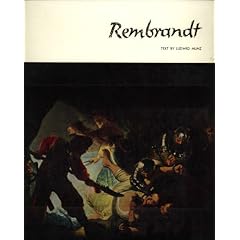
Rembrandt Harmensz Van Rijn: Rembrandt (Library of Great Painters)

~ Ludwig Munz (Author), Bob Haak

(ND 653 .R4 M785 1954 Oversized)


The Amy Vanderbilt Complete Book of Etiquette

 (BJ 1853 .V27 1978)


Miss Manners' guide to excruciatingly correct behavior

by Judith Martin

(BJ 1853 .M294 1991)


A Weed Is a Flower : The Life of George Washington Carver

by Aliki

(S 417 .C3 A65 1988)


I like the this last one the best.

 So armed with fine art, good manners, initiative and the vision for a better world, I hope this is a good day for you.

The robins are returning.

 Bookishly yours,


Ingrid


Friday, November 13, 2009

Thirteen

 Rather than indulge in Triskaidekaphobia, we should embrace thirteen.

We've got several great books about 13-year-olds (try just typing "thirteen" as a search). Here are two:


The Master Puppeteer by Katherine Paterson  (PZ7 .P273 Mas 1989)
Paterson is a Newbery Award winning author.
Who is the man called Sabura, the mysterious bandit who robs the rich and helps the poor? And what is his connection with Yosida, the harsh and ill- tempered master of feudal Japan's most famous puppet theater? Young Jiro, an apprentice to Yosida, is determined to find out, even at risk to his own life.
Meamwhile, Jiro devotes himself to learning puppetry. Kinshi, the puppet master's son, tutors him. When his sheltered life at the theater is shattered by mobs of hungry, rioting peasants, Jiro becomes aware of responsibilities greater that his craft. As he schemes to help his friend Kinshi and to find his own parent, Jiro stumbles onto a dangerous and powerful secret....


A Long Way Gone:  Memoirs of a  Boy Soldier by Ishmael Beah (DT516.828 .B43 A3 2007)
This is how wars are fought now: by children, hopped-up on drugs and wielding AK-47s. Children have become soldiers of choice. In the more than fifty conflicts going on worldwide, it is estimated that there are some 300,000 child soldiers. Child soldiers have been profiled by journalists, and novelists have struggled to imagine their lives. But until now, there has not been a first-person account from someone who came through this hell and survived. Ishmael Beah, now 25 years old, tells how at the age of twelve, he fled attacking rebels and wandered a land rendered unrecognizable by violence. By thirteen, he'd been picked up by the government army, and Beah, at heart a gentle boy, found that he was capable of truly terrible acts.--From publisher


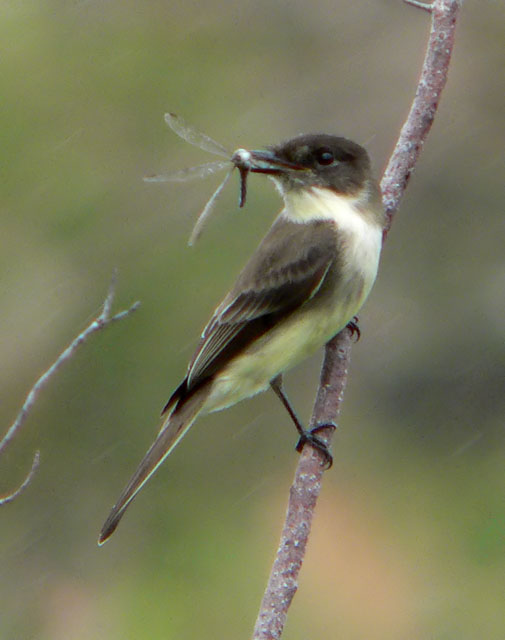
I look out of the window of the library and see so many wonderful things!  Birds, butterflies, the occasionaly stalking cat.  Last Friday it was a phoebe. (Photo by Jim Bailey). 

Bookishly yours,

Ingrid

Friday, November 6, 2009

Gone to the dogs

Do you think you can communicate with animals? Do they have feelings? Do they like to listen to music?
What do animals see?

Find the answers to these questions and more in the book

Animals in Translation: Using the Mysteries of Autism to Decode Animal Behavior by Temple Graham and Catherine Johnson.

How do animals think? How do people think? How do people with autism think? Why do these three groups have so much trouble communicating? This wonderful book throws together humorous animal stories, personal anecdotes, and scientific data to provide some intriguing answers. Grandin's new book on animal behavior draws on her experiences as both a scientist and an autistic person. Her compelling thesis is that there is a lot we still don't know about animal thought and learning but that her condition provides her with an insight into the issues that other people lack. Autism, Grandin argues, closely mimics the psychological condition of animals, in part because both lack facility with language. Indeed, she asserts that animals are autistic savants whose intelligence is unseen by most people. Library Journal


Animals are easily spooked by novelties that humans see as trivialities, such as high-pitched noises, drafts and dangling clothes. Other animals accomplish feats of obsessive concentration; squirrels really do remember where each acorn is buried. The portrait she paints of the mammalian mind is both alien and familiar; she shows that beasts are capable of sadistic cruelty, remorse, superstition and surprising discernment (in one experiment, pigeons were taught to distinguish between early period Picasso and Monet). Publisher's Weekly

You can find this book at call number
QL
751
.G73
2005


Or, if you want something a little lighter on the brain cells try:
 Funny Dogs edited by J.C. Suares. 

Filled with amusing and poignant anecdotes by such writers as James Thurber and Mark Twain, this companion volume to Funny Cats makes us laugh aloud at the antics of our canine friends. Fifty illustrations, including vintage images, display dogs at their most playful and unpredictable. (Publisher's description)


Call number 
SF
430
.F85
1995


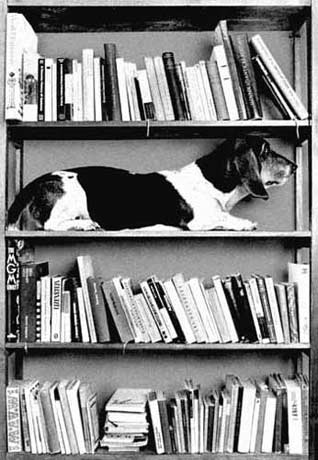
I especially like the photo on the back cover by Czech photographer Antonin Maly:
Take a look at Maly's web site too:  http://www.antoninmaly.cz/en/ 
Pictures of chickens!

OK.  Want to do something REALLY mindless?  Take a look at
Upside Down Dogs.  Sheesh.


This day is another good one.  Do something in the sun today.


Bookishly yours,

Ingrid